Campaigns management

Campaigns management

CRops is an internal proprietary CMS that underpins Cashrewards’ cashback operations — managing member accounts, transactions, merchants, and card linking. As a core platform, it plays a vital role in the daily workflows of Cashrewards employees.

CRops is Cashrewards’ internal CMS, powering cashback operations and supporting daily workflows across member, merchant, and transaction management.

CRops is an internal proprietary CMS that underpins Cashrewards’ cashback operations — managing member accounts, transactions, merchants, and card linking. As a core platform, it plays a vital role in the daily workflows of Cashrewards employees.

PRODUCT DESIGN · INTERNAL TOOL
YEAR

2024

DURATION

1 month

ROLE

Product Designer

DEVICE

Web

OVERVIEW

Existing internal tool (CRops) was built ad-hoc over 9 years. I was tasked with rebuilding a new interface for the internal system whilst designing the new campaign management feature to improve operational efficiency.

Problem

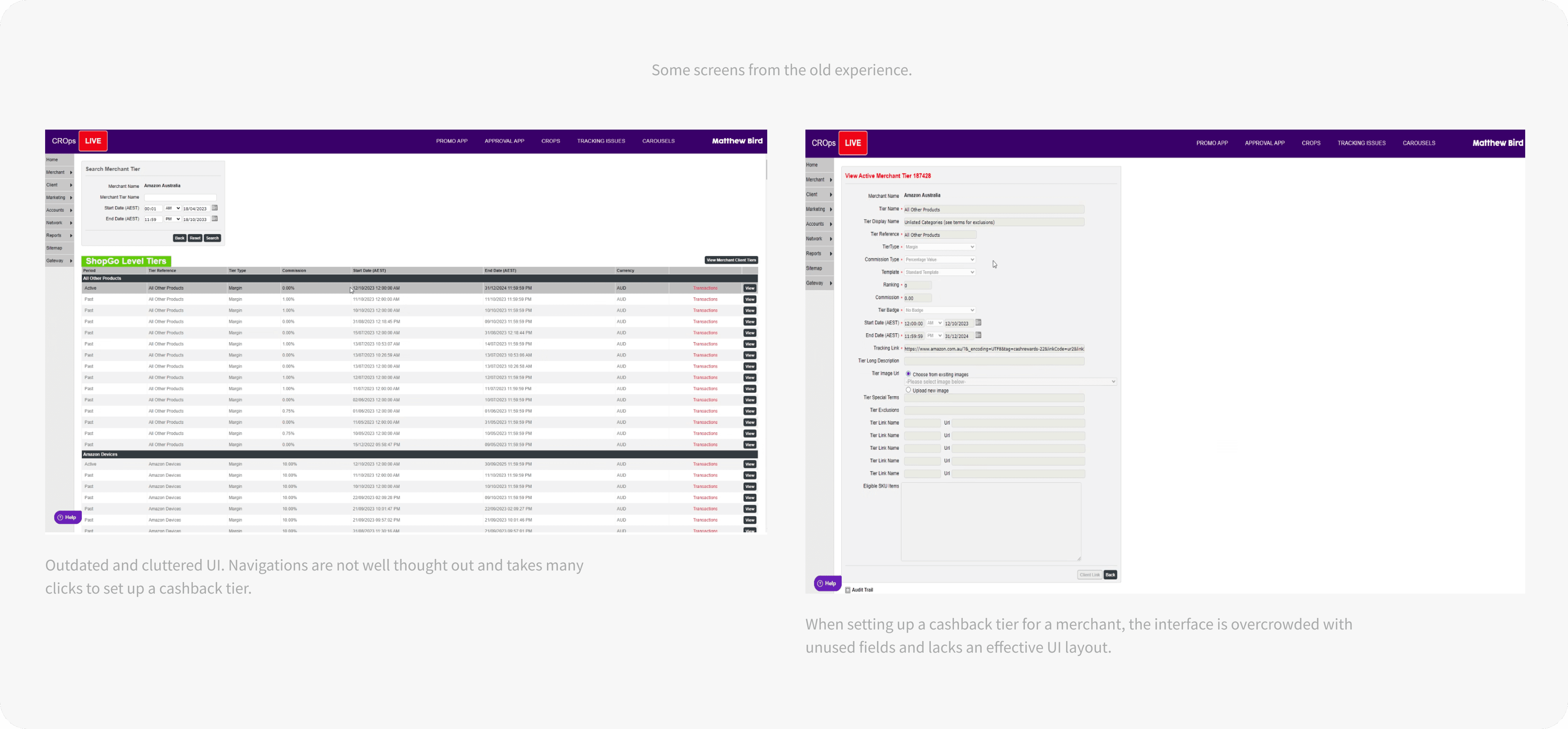
The existing internal tool (CRops) is a legacy system that was built ad hoc over 9 years, lacking UX considerations, which has led to a cluttered interface that is both difficult to navigate and challenging to expand with new features. At the same time, the operations team required a new feature to track budgets associated with campaign setup.
ABOUT

Design process

Understanding current workflow

We kicked off by running a workshop with the operations team to understand how they currently use the system to set up cashback tiers and campaigns. We dug into their existing process and asked questions to uncover any pain points or inefficiencies. This helped me gain a clear understanding of their workflow and where the experience could be improved.

iNSIGHTS

Opportunities

Cluttered interface

Outdated UI and poor UX made it difficult to navigate the system.

Workflow duplications

Poor UX meant a lot of the work had to be duplicated and repeated in various parts of the system that overlapped.

Legacy back-end systems

Will need to ensure the new designs work effectively with existing legacy infrstructure.

Tracking campaign budgets

Currently theres no way to track budgets for campaigns and calculations and tracking are all done manually through various programs.
PROBLEM STATEMENT

The internal system is inefficient due to years of tech and design debt and lacks budget tracking for campaigns, limiting operational effectiveness.
How might we streamline the system experience to improve efficiency and enable budget visibility for the operations team?

ABOUT

Design process

FINAL DESIGNS

Final design highlights

CAMPAIGNS

Campaigns list

User scenario

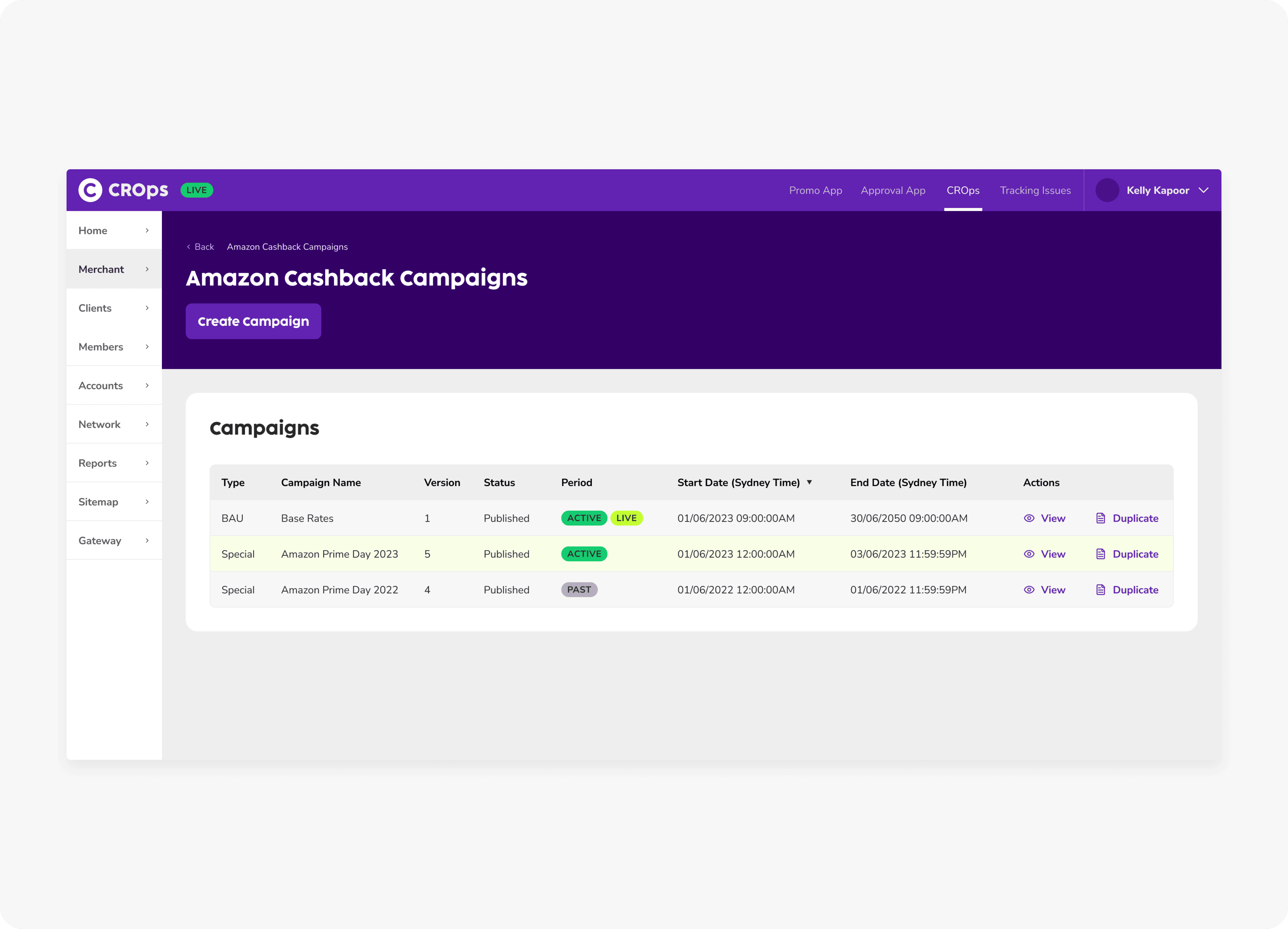
Client Services and Ops need to quickly view both past and active campaigns both at a high level and in more detail.

Solution

Simplified campaign list view with new UI where users can now easily view and duplicate campaigns with one click.

CAMPAIGNS

Campaign detail

User scenario

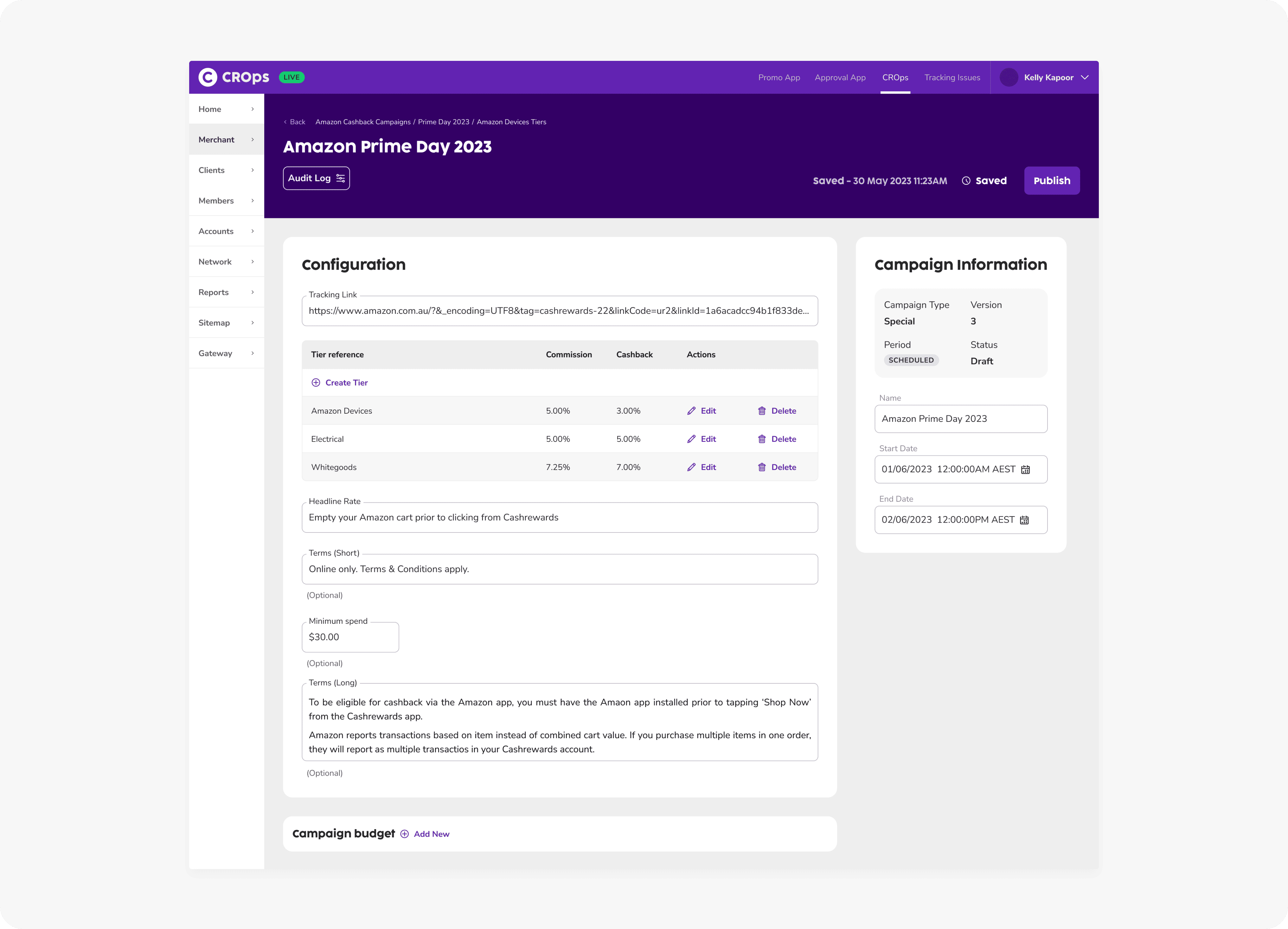
Client Services and Ops need a way to set up special campaign tiers and manage key campaign details.

Solution

Once a user view a specific campaign, the new simplified campaign detail page allows users to easily create tiers and edit campaign information.

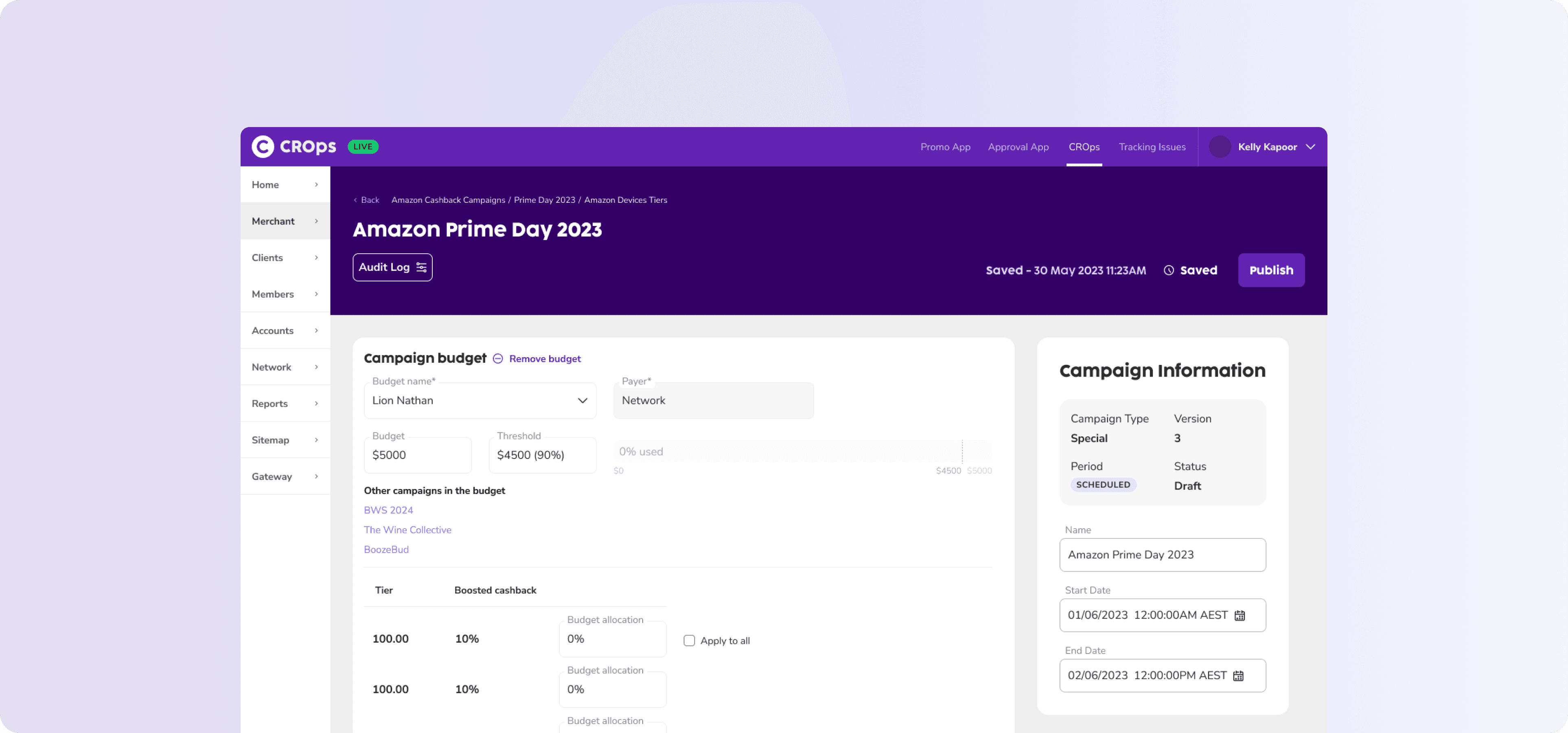
CAMPAIGN BUDGET

Track budgets

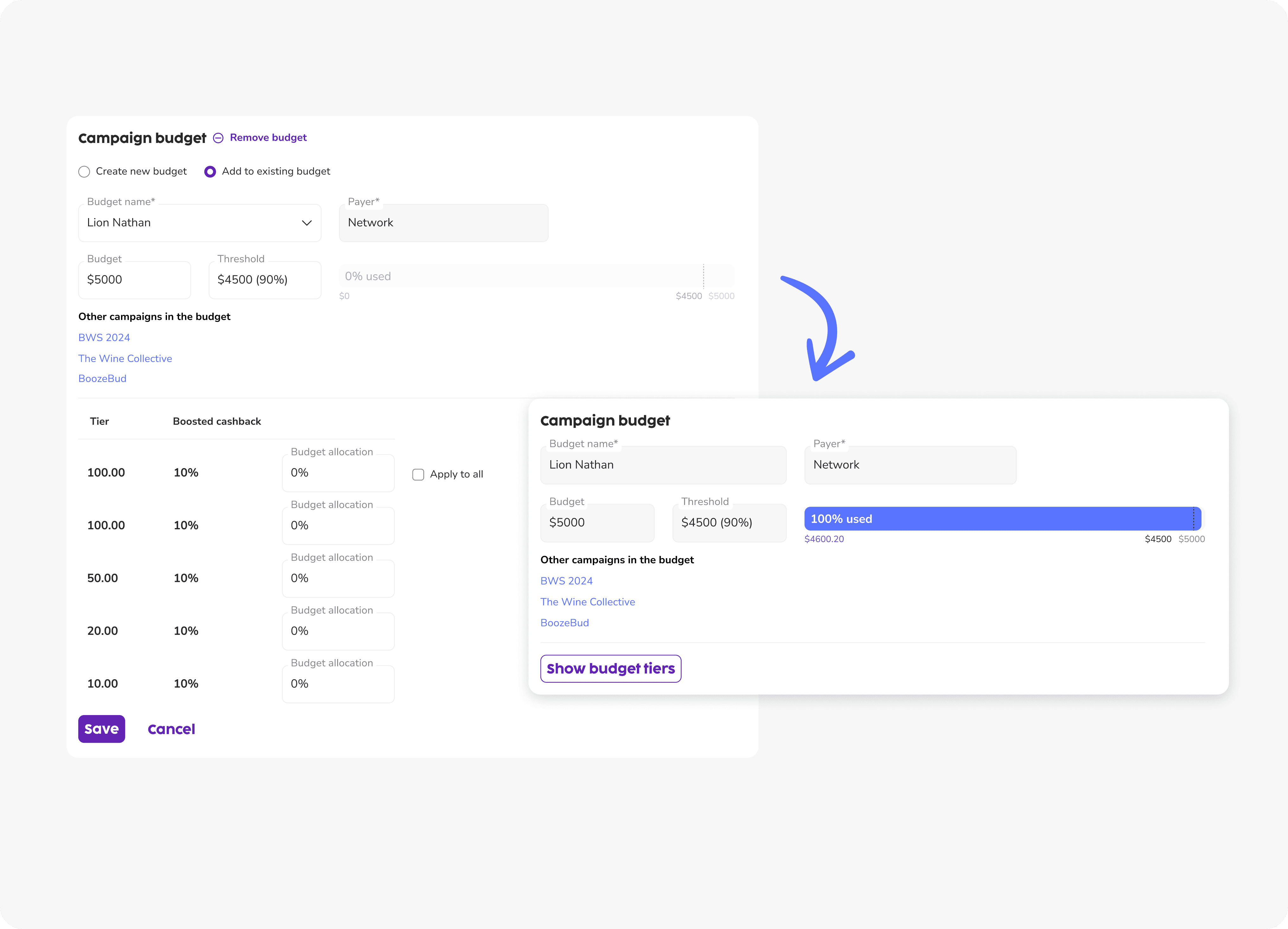
User scenario

Client Services and Ops currently track campaign budgets manually and deactivate campaigns manually once limits are reached.

Solution

Allow users to set campaign budgets with thresholds that trigger alerts and auto-deactivation removes the need for manual tracking and campaign management.

REPORTING

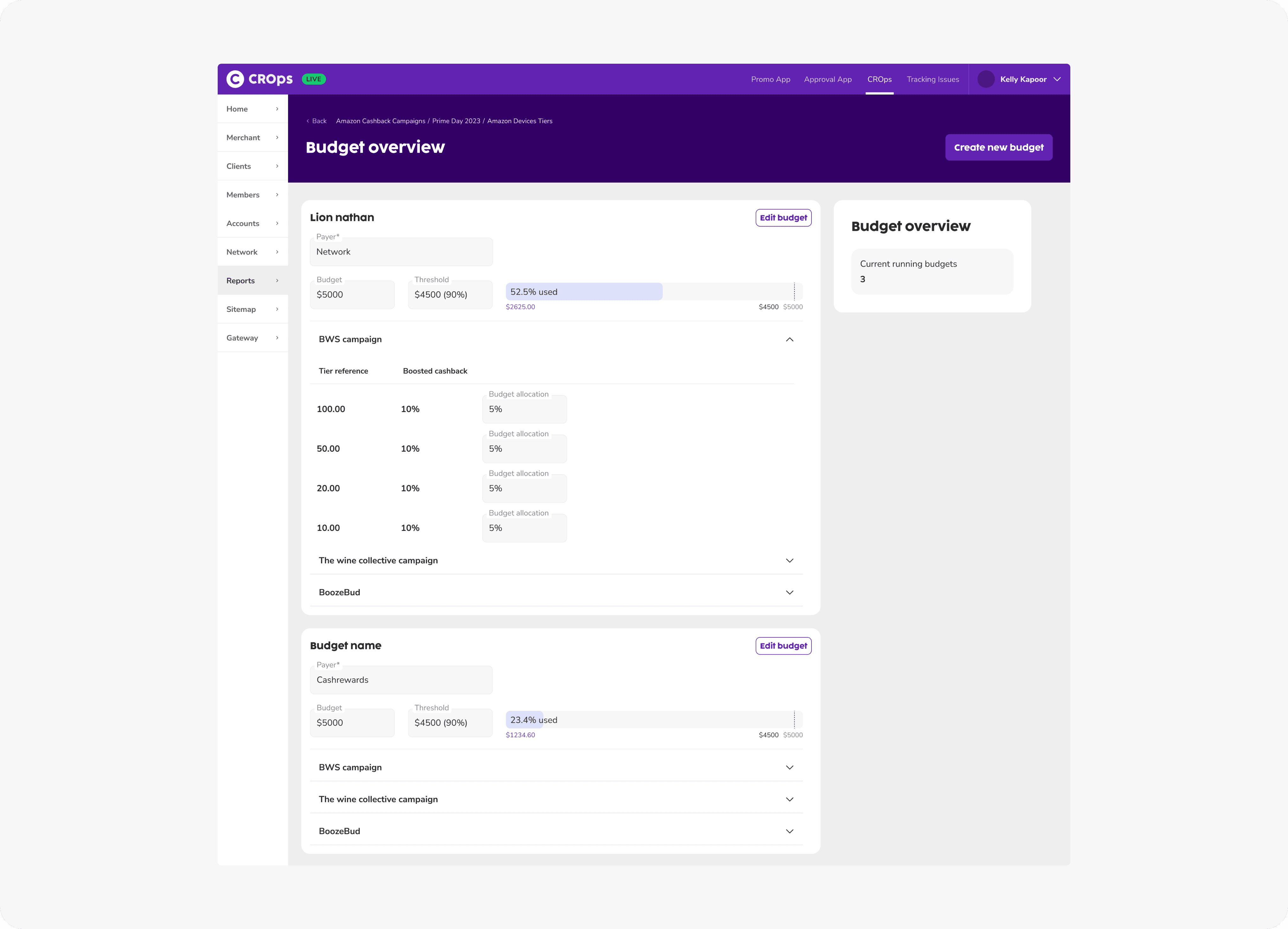
Budget overview

User scenario

Client Services currently manage all active budgets manually, spread across multiple areas, and rely on Excel to compile and report figures.

Solution

Within the "Reports" tab, a Budget Overview page displays all currently active budgets for quick and easy reference. In the future, users will also be able to download a CSV file for even faster reporting and data sharing

IMPACT

The new budget tracking feature has allowed our internal team to completely eliminate manual processes for budget calculations and campaign deactivation. With the launch of the updated CRops interface, the Client Services and Operations teams have found the experience significantly more intuitive and less cluttered, leading to faster and more efficient workflows.

"It's so much easier to navigate and set up a campaign now! Super excited to finally be able to track budgets at a glance and not have to wake up at odd hours of the night to switch off campaigns!"

- Cashrewards Client Services member

Next steps

There are still several complex flows and screens that need to be reworked and aligned with the new front-end experience. To help identify and prioritise these, a prioritisation matrix workshop will be conducted with stakeholders to determine which key workflows should be addressed next.

Understanding current workflow

We kicked off by running a workshop with the operations team to understand how they currently use the system to set up cashback tiers and campaigns. We dug into their existing process and asked questions to uncover any pain points or inefficiencies. This helped me gain a clear understanding of their workflow and where the experience could be improved.

PROBLEM STATEMENT

The internal system is inefficient due to years of tech and design debt and lacks budget tracking for campaigns, limiting operational effectiveness.
How might we streamline the system experience to improve efficiency and enable budget visibility for the operations team?

FINAL DESIGNS

Final design highlights

Next steps

There are still several complex flows and screens that need to be reworked and aligned with the new front-end experience. To help identify and prioritise these, a prioritisation matrix workshop will be conducted with stakeholders to determine which key workflows should be addressed next.

CAMPAIGNS

Campaigns list

User scenario

Client Services and Ops need to quickly view both past and active campaigns both at a high level and in more detail.

Solution

Simplified campaign list view with new UI where users can now easily view and duplicate campaigns with one click.

CAMPAIGNS

Campaign detail

User scenario

Client Services and Ops need a way to set up special campaign tiers and manage key campaign details.

Solution

Once a user view a specific campaign, the new simplified campaign detail page allows users to easily create tiers and edit campaign information.

CAMPAIGN BUDGET

Track budgets

User scenario

Client Services and Ops currently track campaign budgets manually and deactivate campaigns manually once limits are reached.

Solution

Allow users to set campaign budgets with thresholds that trigger alerts and auto-deactivation removes the need for manual tracking and campaign management.

REPORTING

Budget overview

User scenario

Client Services currently manage all active budgets manually, spread across multiple areas, and rely on Excel to compile and report figures.

Solution

Within the "Reports" tab, a Budget Overview page displays all currently active budgets for quick and easy reference. In the future, users will also be able to download a CSV file for even faster reporting and data sharing

"It's so much easier to navigate and set up a campaign now! Super excited to finally be able to track budgets at a glance and not have to wake up at odd hours of the night to switch off campaigns!"


- Cashrewards Client Services member


IMPACT

The new budget tracking feature has allowed our internal team to completely eliminate manual processes for budget calculations and campaign deactivation. With the launch of the updated CRops interface, the Client Services and Operations teams have found the experience significantly more intuitive and less cluttered, leading to faster and more efficient workflows.